Transparently Calculate On-Premises AI Costs
The LLM Hardware Cost Calculator by OnPrem.AI
Our LLM Hardware Cost Calculator is an SLA-based web tool that helps businesses professionally calculate hardware requirements and costs for running their own Large Language Models (LLMs).
Unlike simple sizing tools, this calculator dimensions your hardware based on Service Level Agreements (SLAs), the industry standard for reliable, predictable IT infrastructure.
What is an SLA?
A Service Level Agreement defines measurable performance guarantees for IT services. In the context of AI infrastructure, this means: “Each user receives at least X tokens per second, Y% of the time.”
Why are SLAs important?
- Reliability: Users expect consistent performance, not sporadic delays
- Predictability: Measurable metrics instead of vague “should be enough” estimates
- Accountability: IT can make clear performance commitments to the business
- Budget certainty: Hardware is neither over- nor under-dimensioned
Without SLAs, you dimension by gut feeling. With SLAs, you have mathematical guarantees.
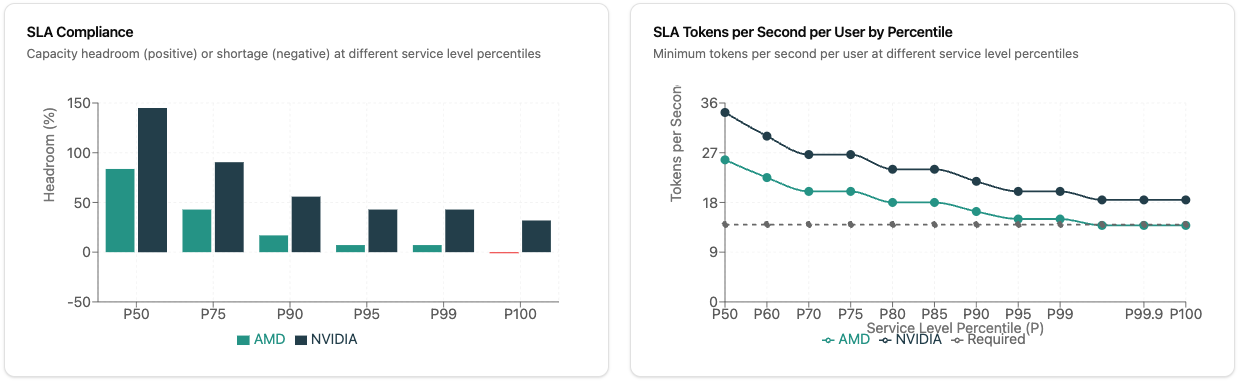
Hardware Sizing with SLA Guarantees
The heart of the calculator: You define Service Level Agreements, the calculator delivers the right hardware.
How does the calculation work?
The calculator uses a statistically validated, user-centric approach: It guarantees minimum performance for each user, even during peak load times when all users interact with the LLM simultaneously. The concurrency calculation is based on statistical distribution models derived from real-world enterprise usage patterns. This means the calculator doesn’t just guess how many users will be active at once—it uses mathematical methods that reflect how people actually work in professional environments. The algorithm calculates the expected concurrent user load at your chosen service level, and reserves the guaranteed minimum LLM speed in tokens per second for each active user. Background tasks intelligently use idle capacity and additional hardware is only planned if they exceed it.
Your settings:
- Minimum Tokens/Second per User: Guaranteed response speed (e.g., 20 tok/s for smooth streaming)
- Service Level Percentile: How often should this guarantee hold?
- P90 = 90% of the time (cost-optimized, for non-critical applications)
- P95 = 95% of the time (standard for professional environments)
- P99 = 99% of the time (highly available, for business-critical systems)
- P100 = 100% of the time (worst-case protection, maximum redundancy)
The calculator dimensions hardware so your SLAs are mathematically guaranteed even during peak load.
Realistic Workload Configuration
The calculator distinguishes between different user types:
- Business Users (office workers): Typical usage for email assistance, document editing, summaries
- Developers: Intensive usage with code editors, large contexts, code reviews
- Background Tasks: Automated processes like document processing, APIs, batch jobs, configurable by frequency and token amount
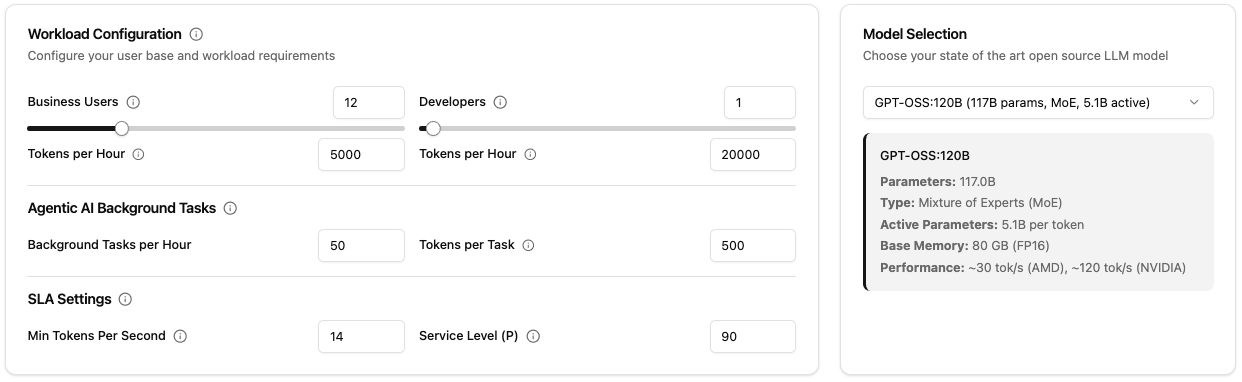
Pre-Configured Industry Scenario Examples
The calculator offers pre-configured presets for typical business scenarios for a quick start without tedious estimation:
- Software Startup: 3 office workers, 6 developers, code analysis and testing
- Small Law Firm: 5 office workers, document processing, legal research
- Accounting Firm: 12 office workers, 1 developer, extensive data processing
- Medium Financial Advisory: 25 office workers, 2 developers, financial reports, market analysis
- Medical Practice: 8 office workers, patient records, medical reports
- Medium IT Provider: 18 office workers, 45 developers, log analysis, system monitoring
- Medical Technology: 7 office workers, 10 developers, high reliability requirements (P99 SLA)
- CNC Workshop: 6 office workers, 4 developers, CAD processing, manufacturing documentation
Each preset contains realistic default values for token consumption, background tasks, and recommended SLA levels based on industry requirements. You can use any preset as a starting point and customize it individually.
Hardware Comparison: AMD vs. NVIDIA
The calculator compares both platforms under identical SLA conditions:
- AMD Ryzen AI Max+ 395: Ideal for MoE models, cost-efficient, lower power consumption
- NVIDIA RTX Pro 6000: Highest performance, better for large dense models, higher throughput
You see directly: How many units do you need for your SLAs? What does it cost? How do power and cooling differ?
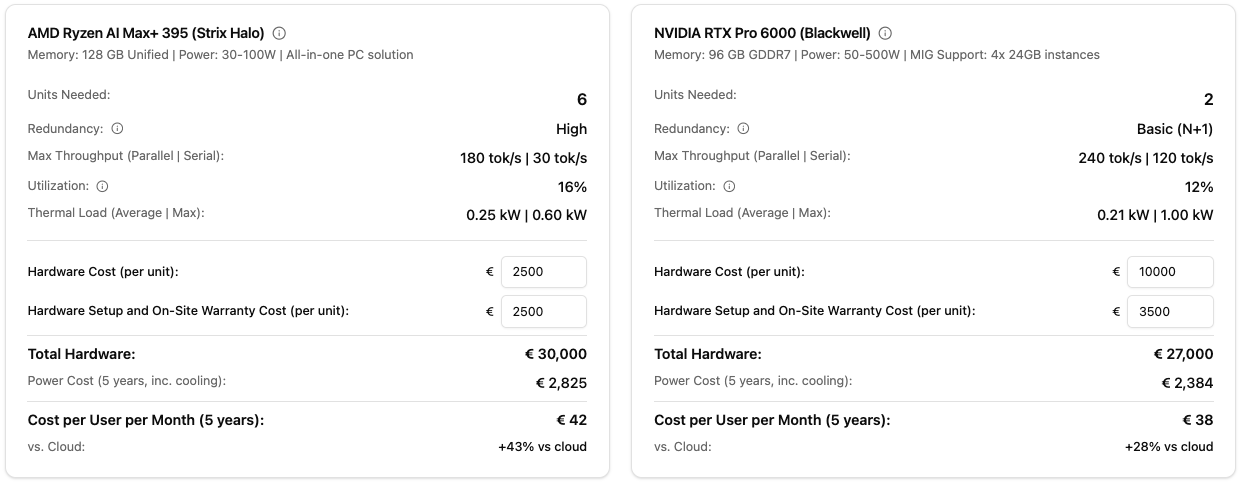 The calculator shows in real-time the required hardware for your SLA requirements with AMD and NVIDIA in direct comparison
Model Selection
The calculator focuses on large open-source models (30B+ parameters) that represent the state-of-the-art for professional enterprise use cases. These models offer superior reasoning capabilities, better instruction following, and higher quality outputs that justify the infrastructure investment. Smaller models may be suitable for specific tasks, but for comprehensive AI deployments that serve diverse business needs, large models provide the best balance of capability and cost-effectiveness.
Supported models:
- GPT-OSS:120B (MoE, 5.1B active parameters), excellent for AMD hardware
- DeepSeek-V2 67B (MoE, ~7B active parameters)
- Mistral Large 2 67B (Dense)
- Llama 3.1 32B (Dense)
- Qwen 2.5 32B (Dense)
For each model, the following are automatically calculated: memory requirements, memory bandwidth, expected token speed per second on AMD/NVIDIA.
Visualizations & Analytics
The calculator offers multiple diagrams:
- Cost Breakdown: Hardware vs. setup vs. power over the years
- Token Source Breakdown: Where does your load come from? (Business Users, Developers, Background)
- SLA Compliance: How much headroom do you have at P50, P75, P90, P95, P99, P100?
- Tokens/Second per User: Guaranteed performance at different concurrent user levels
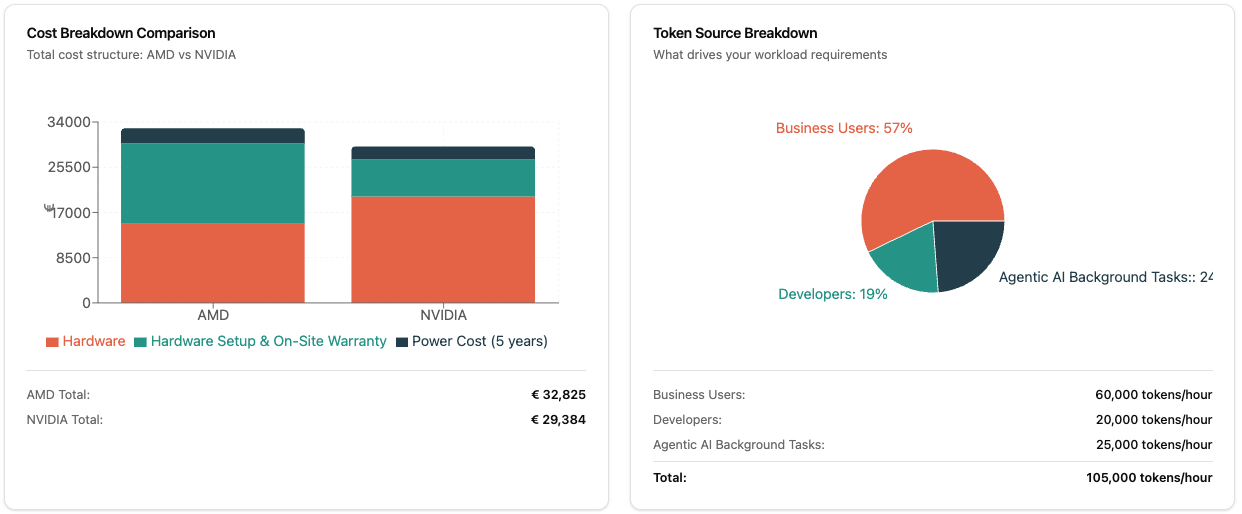 Detailed cost breakdown, token distribution, and SLA compliance analyses help with informed decision-making
Technical Foundation
The calculator is based on real benchmark data:
- AMD Ryzen AI Max+ 395: 128 GB Unified Memory, ~210-215 GB/s Bandwidth, particularly efficient for MoE models
- NVIDIA RTX Pro 6000 Blackwell: 96 GB VRAM, ~1.6-1.8 TB/s Bandwidth, highest tokens/second rates
The calculations consider:
- Memory Bandwidth as the main bottleneck in LLM inference
- Active Parameters in MoE models (not all 120B need to go through the pipeline)
- Concurrency Patterns (not all users are active simultaneously)
- Thermal Load (idle vs. peak power consumption)
How to Use the Calculator
- Visit calculator.onprem.ai
- Select an industry preset or configure your user numbers manually
- Choose your preferred LLM model
- Define your SLA requirements (tokens/second, percentile)
- Adjust costs (hardware prices, electricity rate, currency)
- Compare AMD vs. NVIDIA and on-premises vs. cloud
The URL updates automatically with all parameters: You can bookmark scenarios and share them with your team.
Sovereign AI and Data Control
On-premises LLM deployment enables Sovereign AI with complete control over your AI infrastructure and data. Unlike cloud solutions, your data never leaves your infrastructure, ensuring:
- Full data sovereignty: Meet GDPR, HIPAA, and industry-specific compliance requirements
- Independence from vendors: No lock-in to proprietary AI platforms
- Predictable costs: Fixed infrastructure investment instead of per-token pricing
- Privacy by design: Sensitive business data stays within your controlled environment
The calculator helps you plan the infrastructure needed for true Sovereign AI implementation.
Legal Notice
Important: This calculator is a non-binding planning tool and does not constitute a sales offer.
The calculations are based on experience, estimates, standard assumptions, and benchmark data from publicly available sources. Contact us for precise calculations.